
1. Introduction: What is the ELK Stack?
The Problem: The Data Deluge in Modern Architecture
In the early days of software development, troubleshooting an application was a relatively straightforward task. If a web server threw an error or a database query failed, a system administrator could simply SSH into a single monolithic server, open a terminal, and run a tail -f /var/log/syslog or use grep to find the exact timestamp of the failure. The logs lived in one place, the environment was static, and the variables were limited.
However, modern software architecture has fundamentally shifted. Today’s applications are highly distributed, built on microservices, and deployed across dynamic containerized environments using platforms like Docker and orchestrated across diverse cloud infrastructures. While this approach provides incredible scalability and agility, it creates an absolute nightmare for observability.
When a user reports that a checkout process failed, the root cause could be buried anywhere. Was it the load balancer? The frontend web server? A timeout in the RESTful API? A slow MySQL database query? Or perhaps a networking issue at the TCP/IP layer? Modern applications generate massive amounts of decentralized log data across these different microservices, servers, and network devices. Trying to manually aggregate, parse, and correlate these logs to troubleshoot an issue without a centralized tool is exactly like trying to find a needle in a haystack—while the haystack is on fire and constantly moving.
The Solution: The ELK Stack
This is precisely where the ELK Stack enters the picture. ELK is an acronym representing three powerful, deeply integrated open-source projects maintained by Elastic: Elasticsearch, Logstash, and Kibana.
Together, these three components form a seamless, end-to-end data pipeline designed to ingest data from any source, in any format, parse it, store it securely, and make it searchable and visualizable in near real-time. Whether you are dealing with application error logs, system metrics, or complex network security events, ELK provides the centralized observability platform required to make sense of the chaos.
The Evolution: Welcome to the "Elastic Stack"
While the industry still affectionately refers to it as the "ELK Stack," the ecosystem has evolved significantly over the years. Recognizing that relying solely on Logstash for data collection could be heavy and resource-intensive, Elastic introduced a new family of lightweight, single-purpose data shippers called Beats.
With the introduction of Beats (and more recently, the unified Elastic Agent), the architecture grew beyond just E, L, and K. To reflect this broader ecosystem, the platform is now formally known as the Elastic Stack. Regardless of the name you use, the core mission remains the same: transforming raw, unstructured data into actionable, real-time insights.
2. Core Components and How They Work
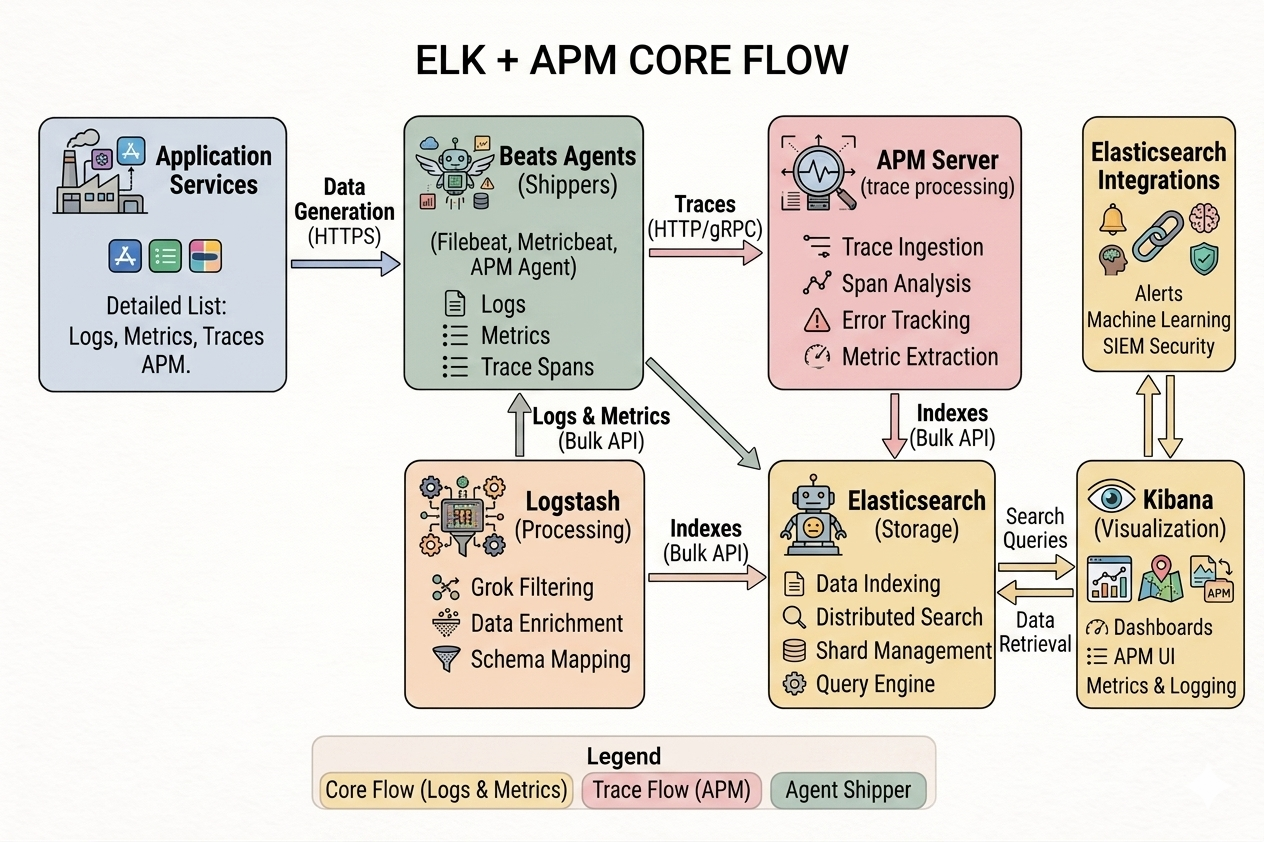
To truly master the Elastic Stack, you must understand the specific role each component plays in the data lifecycle. Think of the stack as a massive industrial factory: raw materials (logs) are gathered, transported, refined, stored in a massive warehouse, and finally displayed in a sleek showroom.
Beats / Elastic Agent (The Shipper)
If Elasticsearch is the heart of the stack, Beats are the capillaries. Beats are lightweight agents, written in Go, that are installed directly on your edge servers, virtual machines, or deployed as daemonsets in containerized environments. Their sole purpose is to collect data at the source and forward it to either Logstash for further processing or directly into Elasticsearch.
Because they are extremely lightweight, they consume minimal CPU and RAM, ensuring your application servers are not bogged down by monitoring tools. There are several specialized Beats:
- Filebeat: The most common shipper, designed to read text-based log files (like Nginx access logs or Laravel application logs) line by line and forward them.
- Metricbeat: Collects system-level metrics (CPU, memory, disk I/O) and service metrics from databases like MySQL or container engines like Docker.
- Packetbeat: A real-time network packet analyzer that monitors application-level protocols and TCP/IP traffic, giving you visibility into network latency and routing issues.
- Heartbeat: Used for active uptime monitoring, pinging URLs and endpoints to ensure your services are responsive.
Logstash (The Processor)
Logstash is the heavy-duty data processing pipeline of the stack. It is a server-side engine that dynamically ingests data from a multitude of sources simultaneously, transforms it, and sends it to a "stash" (typically Elasticsearch).
- Input: How data enters Logstash. It supports numerous input plugins, allowing it to accept data from Beats, read from Kafka queues, listen on TCP/UDP ports, or even pull from cloud storage buckets.
- Filter: This is where the magic happens. Unstructured log lines (like a raw Apache web log) are virtually useless for analytics. Logstash uses filters to parse this text. The most famous is the Grok filter, which uses regular expressions to break a raw log string into structured JSON key-value pairs.
- Output: Once the data is parsed and enriched, the output plugin dictates where it goes. While Elasticsearch is the most common destination, Logstash can also output to automated alerting systems or file archives.
Elasticsearch (The Storage & Search Engine)
Elasticsearch is the absolute core of the stack. It is a highly scalable, distributed, NoSQL search and analytics engine built on top of the powerful Apache Lucene library.
Unlike traditional relational databases that store data in tables and rows, Elasticsearch is document-oriented. It stores complex data entities as structured JSON documents. When data is ingested, Elasticsearch does not just store the text; it indexes it using an inverted index, which allows it to execute lightning-fast full-text searches across petabytes of data in milliseconds.
Kibana (The Visualizer)
Data is only valuable if it can be understood. Kibana is the web-based user interface that sits on top of Elasticsearch. It acts as the window into your data, transforming the raw JSON documents stored in Elasticsearch into highly interactive, visual formats.
3. Top Real-World Uses of the ELK Stack
| Use Case | Description |
|---|---|
| Log & Infrastructure Monitoring | Centralizing system logs (Syslogs, Nginx, Apache) to track server health (CPU, RAM, disk space) and catch server crashes instantly. |
| Application Performance Monitoring (APM) | Allowing developers to track application latency, trace API requests across microservices, and pinpoint broken database queries. |
| Security & SIEM | Ingesting audit logs, firewalls, and network data to detect unauthorized access, brute-force attacks, or anomalous behavior in real-time. |
| Business Intelligence & Analytics | Tracking user behavior, search trends, checkout drops, and conversion funnels to drive data-backed business choices. |
4. The Benefits of Adopting ELK
- Real-Time Architecture: Data becomes searchable within seconds of ingestion, allowing teams to spot critical bugs or security threats immediately.
- Horizontal Scalability: Handles massive data scaling gracefully by distributing data across multiple cluster nodes and shards.
- Massive Plugin Ecosystem: Highly customizable, supporting hundreds of community-built plugins for diverse inputs and outputs.
5. Common Pitfalls and Best Practices
The JVM Memory Trap
Both Elasticsearch and Logstash run on the JVM and can be heavy on resources. Best Practice: Use Beats on your edge servers instead of running Logstash everywhere. Decouple collection from processing to save application server RAM.
Data Retention
Massive logs will quickly eat up disk space. Best Practice: Implement Index Lifecycle Management (ILM) to automatically move older data to cheaper storage and automatically delete or archive data past its retention period.
Security by Default
Best Practice: Turn on TLS encryption and Role-Based Access Control (RBAC) so your internal system logs aren't accidentally exposed to the public internet. Restrict access based on the principle of least privilege.
6. Conclusion
The modern digital landscape is complex, distributed, and incredibly noisy. Relying on outdated manual troubleshooting methods is a guaranteed path to prolonged downtime, frustrated users, and exhausted engineering teams.
The ELK Stack—or Elastic Stack—solves this fundamental problem by providing a centralized, highly scalable pipeline that converts an overwhelming deluge of raw text data into an organized, visual, and immediately actionable map of your system's health.
Are you currently running ELK in production, or looking into managed alternatives like Elastic Cloud? Let us know your thoughts below!