

The artificial intelligence landscape has undergone a seismic shift in the last two years. When Large Language Models (LLMs) first captured the public imagination, the narrative was dominated by massive, cloud-based behemoths. Interacting with AI meant sending your queries over the internet to remote servers housed in monolithic data centers. However, a silent revolution has been brewing in the open-source community: the rise of on-device, local AI.
Running LLMs locally means downloading the weights of a neural network directly to your personal computer, laptop, or enterprise server, and executing the inference using your own hardware. This paradigm shift offers a fundamentally different approach to interacting with artificial intelligence.
In this comprehensive guide, we will explore the architecture of a modern local AI workflow, drawing upon a robust stack featuring Open WebUI, LiteLLM, Ollama, and n8n. We will dissect how these components work in harmony, objectively weigh the advantages and disadvantages of moving away from the cloud, and take a deep dive into the critical privacy implications that are driving organizations and individuals to adopt on-device LLMs.
Deconstructing the Local AI Workflow Stack
To truly understand how local AI operates, we must look beyond the models themselves and examine the infrastructure that makes them usable. Running a raw Python script to generate text is cumbersome; today’s local AI stacks rival enterprise SaaS platforms in features and usability.
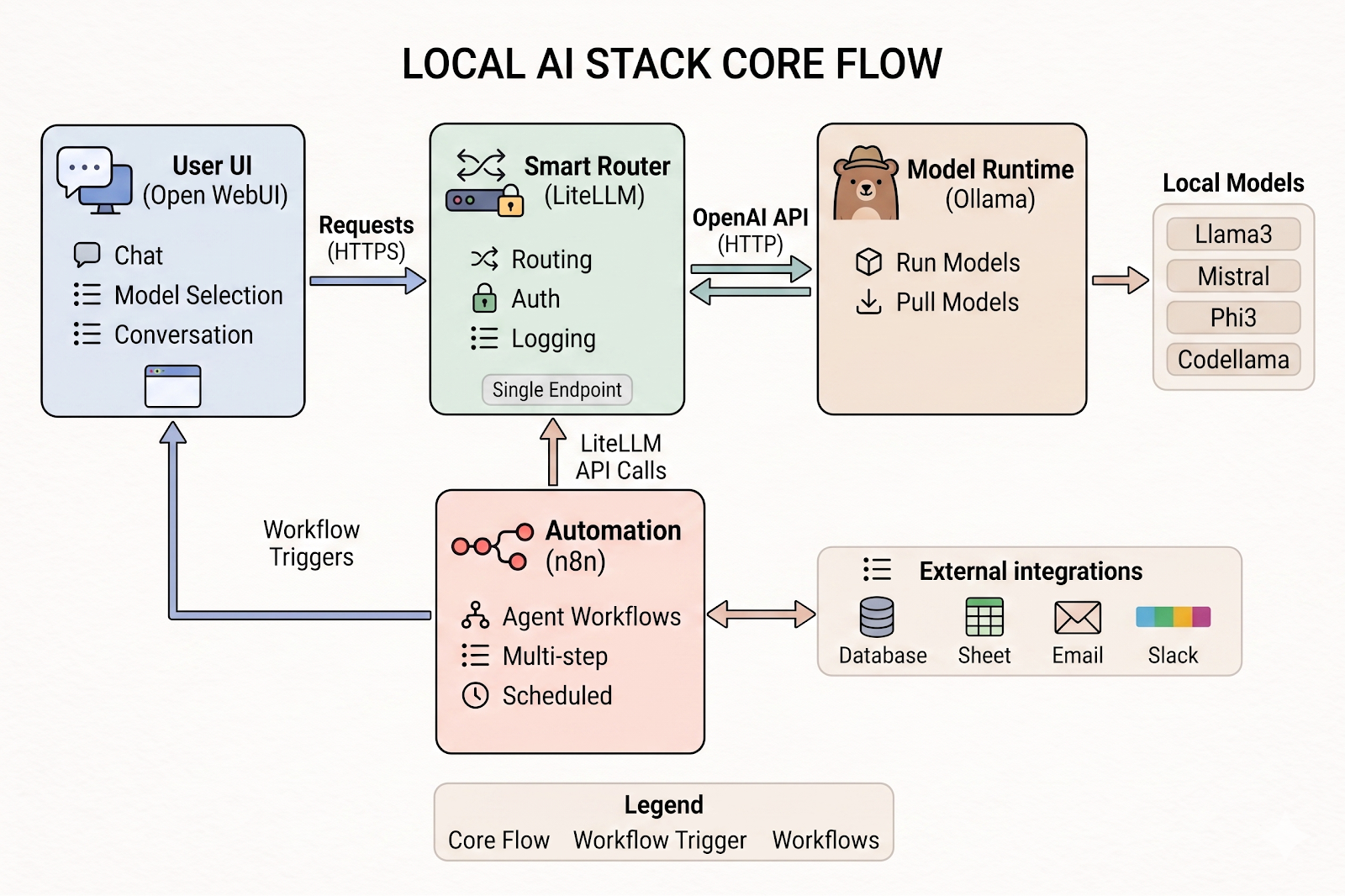
Based on modern architectural best practices for local AI, a robust workflow stack is typically divided into distinct, interoperable layers. Let's break down the ultimate local AI stack: Open WebUI + LiteLLM + Ollama + n8n.
1. The Frontend: Open WebUI
The first layer is the user interface. While developers might be comfortable interacting with AI via terminal commands, a broader audience requires a graphical interface. Open WebUI serves as this intuitive frontend, essentially providing a "ChatGPT-like" experience running entirely on your machine.
- Chat Interface: It provides a clean, familiar conversational window where users can type prompts and receive streamed responses.
- Model Selection: Users can seamlessly toggle between different local models (e.g., switching from a coding model to a creative writing model) with a single click.
- Parameters Management: Advanced users can tweak inference parameters like Temperature (controlling creativity/randomness), Top-P, and context window size directly from the UI without touching code.
- Conversation History: Chats are saved locally in a database, allowing users to revisit previous brainstorming sessions or coding queries.
- User Management: For team environments running a shared local server, it supports multiple accounts and permissions.
2. The Proxy and Router: LiteLLM (Localhost:4000)
As your local AI ecosystem grows, you might end up running multiple models, perhaps even distributing them across different machines on your local network, or mixing local models with cloud fallbacks. LiteLLM acts as the crucial middleman—a proxy and router.
- Single OpenAI-Compatible Endpoint: This is LiteLLM's superpower. It takes the myriad of different APIs used by various models and standardizes them into the ubiquitous OpenAI API format. This means any software built to work with ChatGPT can instantly work with your local models by simply pointing the API URL to
http://localhost:4000. - Model Routing: It intelligently directs requests to the appropriate underlying model based on the user's prompt or pre-configured rules.
- API Keys & Auth: It provides a layer of security, allowing you to generate local API keys to control which applications or scripts can access your local LLMs.
- Rate Limiting & Budgets: If you are exposing your local server to a team, LiteLLM prevents one user from hogging all the GPU resources by setting request limits.
- Logging & Monitoring: It tracks latency, token usage, and errors, giving you observability into your local AI operations.
3. The Local LLM Runtime: Ollama
If Open WebUI is the dashboard and LiteLLM is the transmission, Ollama is the engine block. Ollama has revolutionized local AI by drastically simplifying the process of downloading, running, and managing large language models. Before Ollama, running a model required complex Python environment setups, CUDA configurations, and manual dependency management.
- Run Local Models: Ollama handles the heavy lifting of loading the model weights into your computer's RAM or GPU VRAM and executing the inference engine (often based on llama.cpp under the hood).
- Pull Models from Library: Similar to Docker, Ollama features a command-line interface allowing you to type simple commands like
ollama run llama3to instantly download and boot up a model from their curated registry. - Model Management: It handles quantization (compressing models so they fit on consumer hardware) and allows you to customize models using "Modelfiles" to set system prompts and baked-in parameters.
- REST API Server: Ollama exposes its own API (typically on port 11434) which LiteLLM hooks into to generate responses.
4. The Automation Engine: n8n
Chatting with an AI is useful, but the true power of AI is realized when it acts as an agent integrated into your daily workflows. n8n is a powerful, node-based workflow automation tool that can be hosted locally.
- AI Agent Workflows: n8n allows you to drag and drop logical nodes to create complex, multi-step processes where AI makes decisions or transforms data.
- Webhooks & APIs: It can listen for external events (like a new email arriving or a form being submitted) to trigger an AI workflow.
- Integrations: Even though your AI is local, n8n connects it to the outside world. It features integrations with external APIs, Databases, Google Sheets, Email providers, and messaging platforms like Slack.
How the Workflow Operates in Harmony
To see the synergy of this stack, imagine an automated summarization workflow:
- Trigger: An external service (e.g., an email client) sends a payload to a webhook hosted by n8n.
- Request Generation: n8n processes the email text and formats a prompt asking for a summary. It sends this request via HTTP to LiteLLM.
- Routing: LiteLLM receives the OpenAI-compatible request, checks its internal routing table, and forwards the prompt to Ollama.
- Inference: Ollama feeds the prompt into a local model (like llama3 or mistral), computes the summary using your local hardware, and streams the output back to LiteLLM, which returns it to n8n.
- Action: n8n takes the summarized text and pushes it to a designated Slack channel or logs it into a Database.
Simultaneously, a user could be conversing with the exact same models via the Open WebUI interface, with LiteLLM managing the traffic between the UI users and the n8n automation requests.
The Advantages of On-Device LLMs
The decision to migrate from cloud-based APIs to a local AI stack is driven by several compelling advantages that span cost, performance, and operational control.
1. Absolute Cost Predictability and Elimination of Usage Fees
Perhaps the most immediate advantage of local LLMs is the financial model. Cloud-based LLMs operate on a "pay-per-token" model. Every word you send as a prompt, and every word the AI generates, costs a fraction of a cent. While this seems cheap initially, at an enterprise scale—or for a power user running complex n8n workflows that process thousands of documents—these costs compound exponentially.
Running LLMs on-device shifts the financial model from Operational Expenditure (OpEx) to Capital Expenditure (CapEx). You pay upfront for the hardware (a capable GPU or a Mac with high unified memory). Once the hardware is acquired, running the models—whether you generate ten words or ten million words—costs nothing beyond the electricity required to power the machine. There are no surprise API bills at the end of the month.
2. Unrestricted Offline Capabilities
Cloud LLMs tether your productivity to an internet connection. If your ISP goes down, or if you are working from a remote location, an airplane, or a highly secure air-gapped facility, cloud AI is useless.
On-device models live entirely on your hard drive. Because the inference happens locally through applications like Ollama, you can brainstorm, code, analyze data, and run complex automated workflows completely offline. This ensures high availability and resilience for critical operations that cannot afford internet-dependency bottlenecks.
3. Ultimate Control, Customization, and Uncensored Access
When you use a cloud API, you are at the mercy of the provider. Providers frequently update their models without notice. A prompt that worked perfectly on a Tuesday might suddenly yield terrible results on a Wednesday because the provider "aligned" or "lobotomized" the model to be safer or more efficient.
Furthermore, cloud models are heavily restricted by corporate safety guardrails. While necessary for public platforms, these guardrails can be overly sensitive, refusing to help with completely legitimate tasks like writing cybersecurity penetration testing scripts, analyzing controversial literature, or writing fictional stories with conflict.
With local models, you own the weights. The model will behave exactly the same way today as it will ten years from now, ensuring absolute consistency for your applications. Furthermore, open-weight models allow you to circumvent restrictive corporate filtering, giving you a raw, unaligned tool that you can tailor entirely to your specific operational needs.
4. Zero Latency from Network Transfer
While local hardware might be slower at actually generating the text (inference speed) compared to a massive cloud GPU cluster, local models suffer zero network latency. When you query a cloud model, your data must travel across the country to a data center, be processed, and travel back. For applications requiring instantaneous, real-time responses—such as local voice assistants, robotic control systems, or rapid-fire coding autocomplete—eliminating network round-trips provides a snappier, more responsive experience.
The Disadvantages of On-Device LLMs
Despite the incredible strides made by the open-source community, running AI locally is not without significant hurdles. The "democratization of AI" still heavily favors those with access to high-end hardware and technical patience.
1. The Immense Hardware Barrier (The VRAM Bottleneck)
The single biggest obstacle to running local LLMs is hardware, specifically Video RAM (VRAM). Large Language Models are massive files. To generate text efficiently, the entire model must be loaded into the memory of your graphics card.
Standard consumer laptops and desktops rarely have more than 8GB to 12GB of VRAM. This limits users to smaller models (typically in the 7 billion to 8 billion parameter range, like Llama 3 8B). While highly capable, these smaller models cannot match the reasoning capabilities, expansive knowledge base, and nuanced understanding of massive 70B+ parameter models or trillion-parameter proprietary models like GPT-4.
To run highly intelligent 70B parameter models locally at an acceptable speed, you need multiple high-end GPUs (like dual RTX 4090s, costing thousands of dollars) or an Apple Mac Studio/MacBook Pro with massive amounts of Unified Memory (e.g., 64GB to 128GB of RAM). This high hardware floor makes top-tier local AI prohibitively expensive for many hobbyists.
2. The Capabilities Gap
We must be intellectually honest: as of right now, the absolute smartest models on the planet reside behind proprietary cloud APIs. Companies like OpenAI, Anthropic, and Google spend hundreds of millions of dollars on compute to train their frontier models.
While open-weight models like Meta's Llama 3 are rapidly closing the gap, a local 8B parameter model running on a laptop will simply not perform as well as GPT-4o or Claude 3.5 Sonnet on complex logic puzzles, obscure coding languages, or deep mathematical reasoning. If your workflow requires the absolute bleeding edge of artificial reasoning, local models will leave you wanting.
3. Setup Complexity and Maintenance Burden
While tools like Ollama and Open WebUI have made things vastly easier, setting up the entire ecosystem (especially integrating tools like LiteLLM and n8n via Docker) still requires a degree of technical literacy. You need to understand ports, local network protocols, environment variables, and basic command-line operations.
Furthermore, you are responsible for your own maintenance. When a new model drops, you must manually pull it. If your environment breaks, there is no customer support hotline to call; you must dive into GitHub issues and Reddit threads to troubleshoot.
4. Power Consumption and Thermal Throttling
Running a neural network locally is computationally explosive. When you prompt a local model, your CPU and GPU will spike to 100% utilization. If you are running this on a laptop, your battery will drain astonishingly fast, and the fans will spin up to their maximum speed, generating significant heat. Prolonged use for intense workflows can lead to thermal throttling, where your computer slows itself down to prevent hardware damage, thereby drastically reducing the token-per-second generation speed of the AI.
The Privacy Implication: Local vs. Online LLMs
The debate between local and online LLMs ultimately hinges on one paramount issue: Privacy. In an era where data is the most valuable commodity on earth, deciding where your prompts are processed is a critical security decision.
The Privacy Perils of Online LLMs (The Cloud)
When you type a prompt into an online LLM like ChatGPT, Claude, or Gemini, you are engaging in a massive transfer of trust.
- Data Exfiltration: By definition, your data leaves your device. It travels over the internet and rests on the servers of a third-party corporation.
- Training Data Usage: Historically, many consumer-facing AI providers defaulted to using user prompts and conversations to train their future models. This led to high-profile incidents where employees at major corporations inadvertently leaked proprietary source code, internal meeting notes, and financial projections simply by asking an AI to summarize them. If you put confidential data into a standard cloud AI, you must assume it is compromised.
- Regulatory Non-Compliance: For businesses operating in regulated sectors—such as healthcare (HIPAA in the US), finance, or legal services—uploading client data to a public cloud AI is a severe violation of compliance frameworks. Even with "enterprise" tiers that promise not to train on your data, the simple act of transmitting sensitive Personally Identifiable Information (PII) to an external server requires extensive legal auditing, Data Processing Agreements (DPAs), and rigorous vendor risk assessments.
- The Honeypot Effect: Centralized AI providers are massive honeypots for cybercriminals. If a major AI provider suffers a data breach, your entire prompt history, conversation logs, and potentially sensitive documents could be exposed.
The Absolute Sanctuary of Local LLMs
Running an AI stack locally using the architecture described above (Open WebUI -> LiteLLM -> Ollama) provides an absolute, cryptographically secure shield against these privacy threats.
- Zero Data Telemetry: Look closely at the architecture diagram provided at the beginning of this guide. Notice the addresses:
http://localhost:3000,http://localhost:4000,http://localhost:11434. "Localhost" is the universal networking term for "this very machine." When you use a local stack, the network traffic literally never leaves your computer's motherboard. - The Ultimate "Air-Gap": Because the inference engine (Ollama) has all the model weights stored on your hard drive, it does not need to phone home to generate a response. You can literally unplug your Ethernet cable, turn off your Wi-Fi router, and the AI will continue to function perfectly. This makes local AI the only viable option for handling highly classified information, deeply personal journal entries, unreleased intellectual property, or patient medical records.
- Seamless Compliance: Because no data is transmitted to third parties, utilizing local LLMs inherently bypasses the massive regulatory headaches associated with GDPR, HIPAA, and CCPA regarding data processors. You remain the sole data controller and processor.
- Safe Automation: When integrating automation tools like n8n, local AI allows you to process sensitive internal data safely. For example, you can create an n8n workflow that pulls your personal financial data from a local spreadsheet, feeds it to a local Llama 3 model for analysis, and outputs a financial summary directly to your private local dashboard. The financial data never touches the cloud, yet you still benefit from advanced AI analytics.
Conclusion: The Future is Hybrid
The evolution of Large Language Models is not a zero-sum game between the cloud and the edge. The future of AI is inherently hybrid.
Cloud models will continue to push the boundaries of artificial general intelligence, serving as massive, centralized oracles for incredibly complex reasoning tasks. However, the Local AI Workflow Stack—powered by the synergy of frontends like Open WebUI, routers like LiteLLM, runtimes like Ollama, and automation engines like n8n—represents a democratization of computational power.
By understanding the architecture, respecting the hardware limitations, and leveraging the absolute privacy guarantees of on-device processing, developers, businesses, and privacy-conscious individuals can now wield the power of artificial intelligence on their own terms. Running LLMs on-device is no longer just a hobbyist experiment; it is a robust, viable, and highly secure alternative to the cloud-dominated status quo.